01 Dormant
A thin stripe
Colored dashes wait at the screen edge.
A quiet deck of sticky notes that appears when you reach for it. No app switching. No account.
7-day in-app trial, no card macOS 14+Move over the screen edge
01 Dormant
Colored dashes wait at the screen edge.
02 Fan
Your notes fan out under the pointer.
03 Open
Open one, type, and let autosave handle the rest.
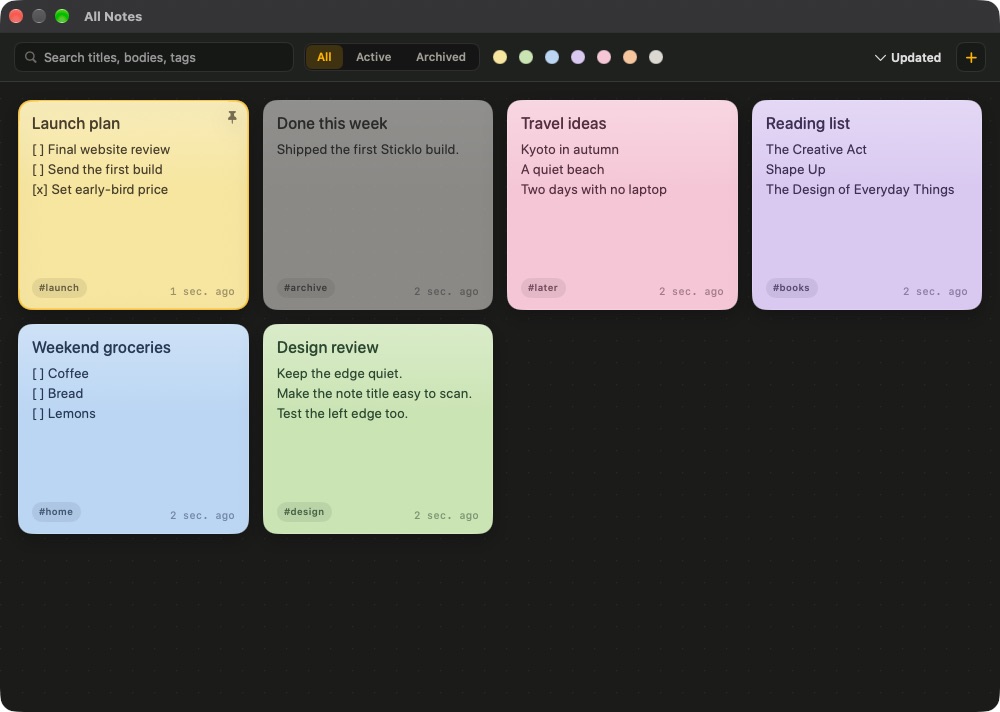
All Notes
Search every note, filter by colour or status, and bring any card back to the edge. The library stays on your Mac.
No account. No analytics.
Note bodies are encrypted before they touch disk.
Keep notes where the work is.
Open a new note without switching apps.
Type, leave, done.
Keep the working set legible.
Try every feature for 7 days with no card. Keep Sticklo with a single payment.
No. Sticklo works without an account. Your notes stay on your Mac.
Locally, with note bodies encrypted. Optional folder sync stays under your control.
Yes. Turn fullscreen access on or off in Sticklo settings.
Yes. A single license covers up to three Macs.